Order
Version: Process description SALES005 v1.0
With the order message, the customer places an order with the supplier. In the order message, one is able to mention all information needed to order the goods or services. One is expected to only provide the ‘transaction-specific’ information. As such, the order message shall remain relatively simple. With the order message, one cannot modify or cancel a previous-sent order.
1 General playing rules
The following rules are applicable in all scenarios:
It is presumed that an order is delivered complete;
‘Per order’ is meant to indicate that the supplier can deliver:
- The requested trade items;
- In the requested quantities;
- At the desired date(s)/time slot(s);
- At the correct place;
If the supplier cannot deliver as per order, it shall be bilaterally agreed on how to proceed. This might ensue in:
- Delivery of those goods/services that the supplier can provide at the requested time;
- Using partial deliveries to satisfy (part of) the order;
- Delivery of a replacement trade item;
- Changing the delivery date or time;
The communication of modifications happens through the order response message, for the playing rules regarding the order response message Order response;
One order, one delivery location is presumed. This simplifies the processing of the messages in the application, and enables an easier connection between invoices and despatch advice messages/packing slip. In practice, this rules means that for every (divergent) location, a different order is to be created.
2 Exchange of order data
Order data is considered to include the processes that enable the customer and supplier to determine specific delivery quantities and delivery time slots. Supplier and customer are expected to mutually agree upon a process that allows for the timely determination and accomplishment of the customer’s request.
Prior to this, a collaboration agreement shall lay down whether they shall use a partial delivery or not. A partial delivery means that per delivery, only part of the order shall be delivered. Per order, the parties can decide which of the scenarios to use. The following scenarios are to be identified:
- ‘Order: partial delivery is not allowed’;
- ‘Order: partial delivery is allowed’.
Differences between the scenarios are found in the agreement as to whether the supplier can deliver an order in multiple deliveries.
3 Scenario: deellevering niet toegestaan
In this scenario, every order leads to one delivery. Partial deliveries are thus not allowed.

Figure 1 - Message cohesion where partial delivery is NOT allowed
3.1 Playing rules for the order in case of the scenario ‘Order: partial delivery is not allowed’
In the scenario ordering without partial deliver (scenario I), the following playing rules apply:
- One order ensues in one delivery;
- One order ensues in one or more order responses;
- An order response refers in the heading to one order;
- If the supplier cannot deliver as per order, he/she delivers what he/she can deliver or modifies, according to the set terms, the delivery date/time slot.
- Other trade items are not included another delivery, the remaining order shall be terminated;
- One order ensues in one despatch advice message;
- One despatch advice message refers in the headings to one order;
- One despatch advice message ensues in one invoice;
- One invoice refers in the headings to one despatch advice message;
- If one truck contains trade items from various order to be delivered, there shall be several despatch advice messages per truck.
Below, an example of the scenario ‘partial delivery not allowed’ can be found. This example presumes that the request amount cannot be delivered:
- The customer finds that the stock of a particular trade item is to be supplemented;
- The customer forwards an order (e.g. 10 pieces of trade item A) to the supplier, possibly referring to an existing contract;
- The supplier compares the requested amount in the order (10 pieces of trade item A) with the available stock;
- The supplier finds that he/she has only 8 pieces of trade item A in his/her stock. The supplier processes the order within his/her system. Possible deviations in the order – in this case, two pieces of trade item A – are mentioned in the order response;
- The supplier prepares the delivery and, if a requested trade item is not in stock, delivers whatever he/she has; in this case thus 8 pieces of trade item A.
4 Scenario: partial delivery allowed
In this scenario, the supplier, if bilaterally agreed upon under particular terms, can deliver the order in several deliveries. The trade items not included in the first delivery, are planned to be delivered at a later time.
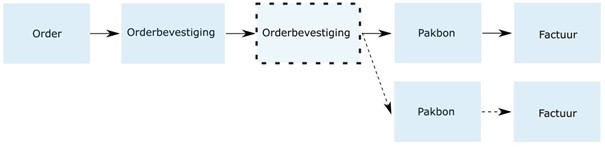
Figure 2 - Message cohesion where partial delivery is NOT allowed
Exception: if the supplier, for whatever reason, cannot deliver the requested amount of trade items within the agreed upon terms, he/she delivers whatever he/she can. The remaining order shall be cancelled. The customer shall have to order the trade items that have not been received again.
4.1 Playing rules for the order in case of the scenario ‘Order: partial delivery is allowed’
In the scenario: ‘order with partial deliver’ it is allowed to deliver the missing trade items at a later point in time. Below, the playing rules relevant in this scenario can be found:
- One order ensues in one or more deliveries;
- One order ensures in one or more order responses;
- An order response refers in the headings to one order;
- If the supplier cannot deliver per order, he/she delivers whatever he/she can;
- The remaining trade items are placed in the partial delivery;
- One order ensues in one or more despatch advice messages;
- One despatch advice messages refers in the headings to one order;
- One despatch advice message ensues in one invoice;
- One invoice refers in the headings to one despatch advice message;
- If one truck contains trade items from various orders to be delivered, there shall be more than one despatch advice message per truck.
Below, an example of the scenario ‘partial delivery allowed’ can be found. This example presumes that the requested amount cannot be delivered with one delivery:
- The customer finds that the stock of a particular trade item is to be supplemented;
- The customer forwards an order (e.g. 10 pieces of trade item A) to the supplier, possibly referring to an existing contract;
- The supplier compares the requested amount in the order (10 pieces of trade item A) with the available stock;
- The supplier forwards an order response to the customer. In the headings, he/she shall indicate that he/she can deliver 100% as per the order (10 pieces trade item A). If a requested trade item is not in stock, the supplier provides whatever he/she has (e.g. 8 pieces trade item A) and indicates in the order response the following partial deliveries;
- The supplier prepares the delivery; 8 pieces of trade item A shall be delivered at the requested date and delivery address, and 2 pieces of trade item A shall be planned for a later delivery, so the customer shall eventually receive the complete amount of 10 pieces of trade item A.
5 Call-off orders
The use of call-off orders is common in the construction and engineering sector. A customer orders a large quantity from its supplier in advance and has it delivered in parts at a time when it needs the goods. The moment of delivery is often not fixed at the time of ordering, but is specified by the customer: the call-off. A variant may be that the supplier takes the initiative and contacts the buyer to determine the delivery time. This does not affect the content of the messages.
5.1 What the documentation says
Process description Transaction messages SALES005 v1.0 gives the following in chapter 7:
Call orders on a framework order can be transmitted by specifying the framework contract number in the order;
Within the description of the order message on Semantic Treehouse is the following about delivery on demand and contract references:
DeliveryOnDemandIndicator Type: xs:Boolean
Definition: Code indicating that the order may only be delivered by the buyer on demand.
Path: Order/DeliveryOnDemandIndicator
ContractReference Type: :ContractReferenceType
Definition: Data used to reference a contract. A contract is a commercial agreement between buyer and supplier, often containing certain conditions and price agreements, possibly linked to a certain turnover. Examples include project contracts, contracts with price agreements and framework contracts with price and purchase agreements. It is true that there is a clear difference between e.g. a project contract and a framework order, but in an EDI order both are seen as referring to a contract.
Path: Order/ContractReference
5.2 Notes on using Call-off Orders
As can be seen from the documentation, the standard does not distinguish between the various contracts and a call-off order is also considered a framework contract. The terms and conditions within such a contract are beyond the scope of the standard; indeed, these can vary greatly from supplier to supplier.
Placing a framework order (the master order) can be done with the buyer sending an order message, with the DeliveryOnDemandIndicator set to TRUE. The rest of the message is then filled as per default.
The supplier confirms this framework order with an order confirmation. This confirmation does not differ from regular order confirmations and refers to the framework order using the OrderReference structure. Here the BuyersOrderNumber must be specified, this number is also used to refer to in the rest of the process.
To get the ordered goods delivered, the buyer sends a second order message (the call-off order), this time without the DeliveryOnDemandIndicator (absent or FALSE), but with a reference to a contract: the number of the framework order. This is specified by the supplier through the order confirmation of the framework order in the OrderReference structure and can therefore be the supplier's number (SuppliersOrderNumber) OR the customer's number (BuyersOrderNumber).
This order can only contain goods included in the original master order. Whether quantities of the framework order may be exceeded, or what happens to leftovers if the framework order is not called in full, should be mutually agreed. The rules of normal orders should be followed.
For subsequent call-offs, the same applies as for the first call-off. These call-off orders may be sent until the framework order has been fully delivered (or the agreements made have been met). Keeping track of quantities ordered and open call-off orders is a task of both parties' software. This, if desired, will have to be made visible in a file of the framework order by the software.
Each call-off order will be followed up with a confirmation, dispatch message and invoice. These messages will have to refer to the relevant call-off order. Then matching can be done at call-off order level and when all call-off orders have been delivered, the framework order can also be finalised. No dispatch notification and invoice will follow the framework order itself. Arrangements must be made in advance regarding the delivery or non-delivery of any remainders and any resulting financial obligations.
6 Return Orders/Returns
The process of returns consists of announcing, confirming, shipping and financial handling of an item to be returned. This process takes place both directly between supplier and buyer and in cooperation with logistics service providers. When returning items, we see the following actions and associated transactional messages:
| Action | Transaction | Explanation |
|---|
|With the 'Request for return' message, the customer informs the supplier which goods (including quantities, period and reason) the customer wants to return. The basic rules as with the order message continue to apply. |Confirmation of the request by the supplier to the buyer |Confirmation by means of order confirmation and reference to the order return request |With the message 'Confirmation of request for return', the supplier responds to the buyer's 'request for return' and indicates whether it (partially) agrees with the 'request for return', or whether it does not agree with the 'request for return'. For this, use the rules that apply to the order confirmation.| |Inform that goods are ready to be returned |Package note with reference to the confirmation number and return request| With the 'Return Goods Notice', the buyer indicates which items confirmed by the supplier (including quantities and conditions) are ready to be shipped with the SSCC(s) of the logistics unit(s). For this, use the process rules that already apply to the packing note.| |Financial handling by the supplier |Credit invoice|With the credit note, the supplier indicates that the goods to be returned will be credited for the agreed arrangements. The rules of the invoice must be followed.|
6.1 Rules of the Return Process
6.1.1 What response times have been agreed?
When creating and processing transactions within the returns process, please take into account the response times from the agreements below. The response time starts from the date of receipt of the message.
Within the sector, we have an agreement that incoming messages are responded to adequately. If there are no bilateral agreements between the parties involved, we use 3 working days as reasonable and adequate. If you find that your trading partner does not respond within the agreed response time, you should contact the party to reach agreement.
6.1.2 Cancellations
There are situations where you want to cancel a 'Request for return' or a 'Request for return confirmation'.
You are a buyer and you do not agree with the supplier's confirmation for one or more items from the return request. You then have 2 options:
You cancel the entire return request and then submit a new return request for the items you do agree with. For this process, agree how and via which channel it will be done
You send the Return Goods Notice and under Number state the value 0 (zero) for the items you do not agree with and therefore do not return.
You are a buyer and You want to cancel the request because, for example, You have now sold the items.
You are a supplier and You do not receive the 'Return Goods Notice' within 3 working days in response to Your 'Confirmation of Request for Return'. You contact the buyer (by phone) to make an appointment for a new period for collecting the goods.
Arrangements will have to be made on how to cancel the Return Order Notification. It is advisable to do this by telephone so that any processes that may have been started can be overcome.
6.1.3 'Request for return' for an unknown item
You have received items, signed the waybill for receipt, but have not yet carried out the check. Then it turns out that the items are not in your range and are not known to you. These goods must be returned. The GS1 article code of these goods is not known to you in the system and there is also no guarantee that a GS1 article code is stated on the trading units and/or delivery note.
It is agreed that you will then provide a 'dummy' GS1 article code (8712345005795) in the 'request for return'. It is a number assigned by GS1 Netherlands on its own company number and also managed by GS1 Netherlands. In addition to the 'dummy' GS1 article code, include as much information as possible in the request for return that can be 'read' from the trade units so that the supplier has identifiers to be able to handle the goods within the procedure of this process. You can include the following additional information:
The GS1 article code listed on the trade unit
The article code of the supplier
The article description
In the 'Confirmation request for return' and in the 'Return goods message', the data from the 'Request for return' ('dummy' GS1 article code and additional information) are taken over again and passed on.
6.1.4 Return without goods
You state in the 'Confirmation request for return' that you wish to credit one or more lines in the 'Request for return' but that the goods are not to be physically returned. To this end, you state the following details in the 'Confirmation of request for return':
At 'Percentage of credit' the relevant value
Under "Number of items to be returned", the value 0 (zero)
In case of a return without goods, you, the buyer, apply the following rules of use:
You always send the 'Return Goods Message', except if you cancel the 'Request for Return' with the message 'Cancel Request for Return'.
In the "Return Goods Notice" you state the value 0 (zero) under "Number of items to be returned".
You also send the 'Return Goods Message' if the supplier has indicated in the 'Confirmation of Request for Return' that all items from the 'Request for Return' will be credited but do not need to be returned. In this case, enter the value 0 (zero) under 'Number of items to be returned' in the 'Return Goods Notice'.
For you as a supplier, receiving the 'Return Goods Notice' (with or without the value 0 (zero) under 'Number of Items to be Returned') is important for starting the financial processing (credit note).
6.1.5 Supplier does not agree with reason in 'Request for return'
As a supplier, you do not agree with the reason given by the buyer in the 'Request for return'.
You apply the following usage rules in this situation:
- You state the reason for the rejection in the 'Request for return confirmation' in the free text field
- You state the value 0 (zero) for 'Percentage crediting' and 'Number of items to be returned'.
As the reason can be used, among other things, to create management information for, for example, the buyer's assessment of a supplier's performance, it is important for you as a supplier to link the correct reason to a return.
6.1.6 Delivery address in 'confirmation of return request'
In many situations, the goods to be returned are collected by the supplier simultaneously with the delivery of items.
In the case of a direct return between you and your supplier, the delivery address is not necessary because the supplier organises the transport and indicates to the carrier where the shipment is to be delivered. If the return is via a groupage or cross-dock centre, the transport is organised by you as the buyer. You then need the supplier's address to indicate to the carrier/logistics service provider at which address the goods to be returned should be delivered.
6.1.7 Composite article
The consumer unit may consist of several parts, for example a wardrobe or a bathroom cabinet. One of the parts turns out to be damaged and you want to return it. However, the GS1 article code (GTIN) of the component is not known in your assortment system, only the GS1 article code (GTIN) of the total package is known. To return the part, act in the same way as described in section 'Requesting a return' for an unknown article.
7 Order handeling
Within the construction and installation sector, three ways for order handeling can be identified:
- Normal order or call-off order Call off order can be communicated by including the window contract number in the order;
- Crossdock-order A crossdock-order is also called a transit order. In a crossdock order, several goods for one final destination are ordered.
- Backhaul / or pick-up order With a backhaul order, the customer him/herself is responsible for the transport of the goods; the goods are picked up by the customer from the supplier. With both a normal order as a crossdock order, there might be a case of backhauling.